



It is now essential for any business owner, regardless of their field of activity, to have a website. Whether you are looking to create a showcase website to present your business or an online store to increase your sales, the steps involved in creating a website remain the same.
This guide will walk you through all the steps involved in creating your website, from purchasing your domain name to launching and maintaining your site.
Summary
The steps involved in creating a website
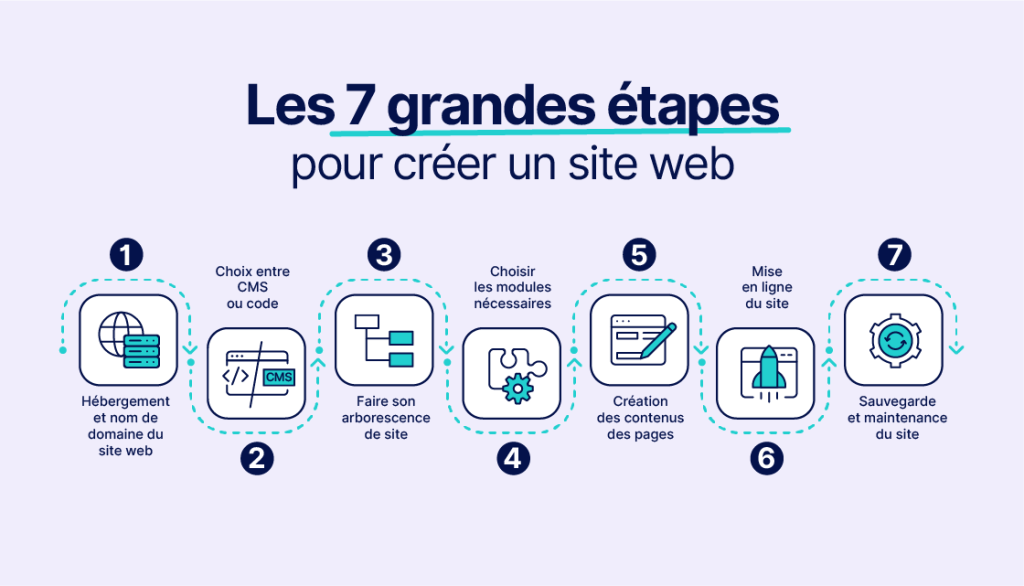
Every website creation project is a journey that begins with choosing a domain name and hosting, continues with selecting the content management system and theme that best suit your needs, and ends with building a clear site map that will guide your visitors.
The next step will involve writing the content for your website, where every piece of information counts in terms of informing, persuading, and optimizing your Google ranking. You can then enhance your website with modules and plugins to improve its functionality.
However, creating a website does not end with going live. Regular maintenance and backup tasks are essential to ensure the performance and security of your site. By following these steps, you can turn your idea into a professional, tailor-made website.
Choosing a domain name and hosting

The domain name is the unique web address that users type into their browser to access your website. It should be representative of your brand or business and easy to remember.
For example, if you sell shoes online, you could choose a domain name such as "shoesonline.com." To check the availability of a domain name, you can use a domain search service such as the one offered by Nindohost.
The importance of the .ma extension for Morocco
If you are targeting the Moroccan market, choosing a .ma extension strengthens your local credibility and improves your visibility in search results in Morocco.
Choose your web hosting
Web hosting is the storage space where your website resides. By choosing a reliable web host, you ensure that your site is accessible 24/7 with good page loading speeds, which is essential for user experience and search engine optimization.
Nindohost offers a range ofweb hosting solutionsin Morocco to suit all needs, from shared hosting for small websites to dedicated servers for larger projects.
Choosing the CMS and theme for your website

A CMS (content management system) is a platform that allows you to build your website without any coding skills. The choice of CMS depends on your specific needs.
WordPress for versatile websites
WordPress is a popular tool for blogs, news sites, and showcase sites, thanks to its simplicity and flexibility. It powers nearly 40% of all websites worldwide.
WordPress offers thousands of themes and plugins to customize and extend the functionality of your website. Whether you're a blogger, entrepreneur, or business, WordPress has everything you need to create a professional website.
PrestaShop for online stores
PrestaShop is a CMS specialized for online stores. It offers a variety of options for managing your catalog, tracking your orders, and adapting your site to your business needs.
Choosing the theme
Your website's theme defines its visual appearance. It is important to choose a theme that reflects your brand image, is appealing to users, and adapts well to different devices (computers, smartphones, tablets).
Create your website's tree structure
Your site's tree structure is the organizational structure of your web pages. It is essential to plan this structure in advance to ensure smooth and intuitive navigation.
For example, a simple tree structure for an online store could include: Home, Catalog (with subpages for each product type), About, Contact.
Tips for a good tree structure
- Simplicity: Limit the number of navigation levels (ideally 3 levels maximum).
- Logic: Group similar content together
- Clarity: Use clear and understandable page names
- Accessibility: Every important page must be accessible within a maximum of three clicks from the home page.
Write your content pages
Content is king on the internet. Every page on your site should offer value to your visitors. For the product catalog, each product should have a detailed and appealing description, accompanied by high-quality images.
Essential content types
- Home page: Clear presentation of your business and your value proposition
- Product/service pages: Detailed descriptions with high-quality images
- Blog articles: Informative and interesting content, optimized for SEO
- About Page: Your history, your values, your team
- Contact Page: Easy ways to reach you
- Legal pages: Legal notices and terms and conditions (mandatory)
Content optimization
To optimize your content, use clear titles, short paragraphs, bulleted lists, and naturally integrate your important keywords. Don't forget to add optimized images with descriptive alt tags.
Install the necessary modules and plugins
Modules and plugins are extensions that add functionality to your site. It is important to choose only the modules you need to avoid overloading your site.
Recommended essential modules
- SEO: To optimize your website's search engine ranking
- Security: Protection against attacks and spam
- Performance: Caching and compression to speed up loading
- Contact forms: To enable visitors to contact you
- Analytics: To track your website statistics
- Backup: To regularly back up your site
E-commerce modules
If you are creating an online store, WooCommerce is a WordPress plugin that transforms your website into a complete online store with product management, shopping cart, and online payment.
Putting your website online
Putting your website online is the moment when it becomes accessible to the public. It's a simple but crucial step.
Checks before going live
Ensure that everything is working as intended before publishing your site:
- Test each page: Verify that all pages display correctly.
- Check links: Make sure that no links are broken.
- Test the forms: Verify that the contact forms are functioning correctly.
- Check responsiveness: Test the display on mobile phones and tablets.
- Check the speed: Make sure the site loads quickly.
- Test the purchasing process: If you have a store, check the entire order funnel.
Technical specifications
Before going live, make sure you have configured:
- SSL Certificate: To secure your site with HTTPS
- Business emails: With your domain name
- Google Analytics: To track your visitors
- Google Search Console: To monitor your SEO
Website maintenance and backup
After your website goes live, it is crucial to perform regular maintenance. This includes updating your CMS, themes, and plugins, checking the site's security, and optimizing performance.
Regular maintenance tasks
- Updates: Regularly update WordPress, themes, and plugins.
- Backups: Back up your site at least once a week.
- Security: Monitor intrusion attempts and change your passwords
- Performance: Optimize loading speed and database
- Content: Add new content regularly to maintain your SEO ranking.
Nindohost offers an automatic backup service that can save you a lot of time and stress in case of problems.
Website creation tools
Choosing the right website builder is crucial to the success of your web project. Among these tools are WordPress, PrestaShop, Wix, and our solution, Site Builder. Each of these tools has its own strengths and specialties.
WordPress: the most popular
WordPress powers nearly 40% of all websites worldwide. Its popularity is based on its flexibility and ease of use. It offers thousands of themes and plugins to customize and extend the functionality of your website.
PrestaShop: e-commerce specialist
PrestaShop is an open-source e-commerce platform that allows you to create your own online store. It comes with a wide range of built-in features to manage your products, process orders, and set up promotions.
Wix: turnkey solution
Wix is an online website builder with a drag-and-drop interface. With Wix, you don't need to know how to code to create a functional website. The platform offers a multitude of ready-to-use templates and features.
Site Builder: simplified creation with AI
Our Site Builder makes creating your website as easy as playing with building blocks. Thanks to artificial intelligence and drag-and-drop functionality, you can create a professional and attractive website without any technical knowledge.
Site Builder offers you a multitude of practical features: connection to social networks, search engine optimization, automatic adaptation to all devices (computer, tablet, smartphone), and support from our team of experts.
Discover how to create a website with AI or how to use WordPress with AI to accelerate your project.
Conclusion
Creating a website may seem like a complex task, but by following these steps methodically, you can ensure the success of your project. From purchasing a domain name to maintaining your site, each step is important in building a professional and effective online presence.
Nindohost is here to support you every step of the way as you build your website, with solutions tailored to all needs and budgets.
To go further:
- Back to the complete website creation guide
- Why create a website for your business?
- Hire a web design agency
- Create a free website
- All our guides to hosting and web design
Guide updated: February 2026